
Building an autonomous AI dev team in an afternoon
Building an autonomous AI dev team is easier than you think, and requires no special tooling. You’re probably already using a git hosting service like GitHub or GitLab, so with a simple cron script and the Claude Code CLI you can build your own autonomous AI dev team in an afternoon.
System overview
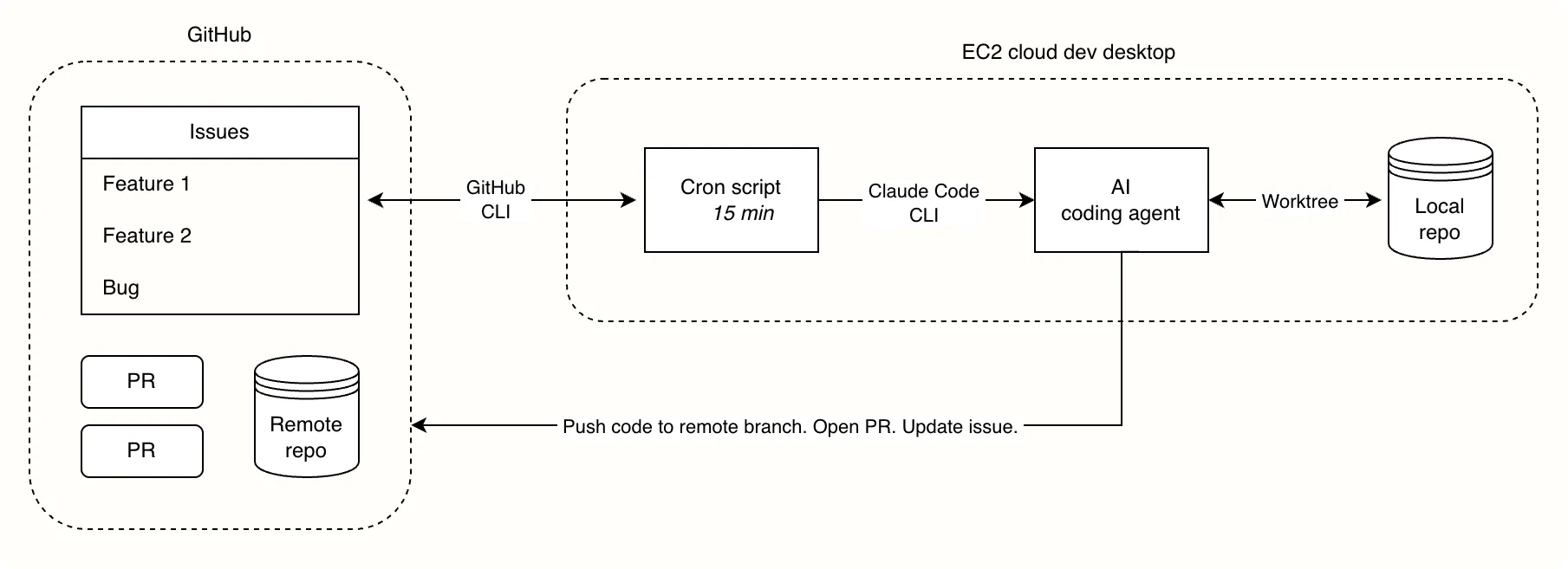
The goal of this project was to build the simplest possible system. It needed to be low-maintenance and easily auditable.
The cron script
Every 15 minutes a bash script runs. Scheduling is handled by cron:
*/15 * * * * [agent-runner-script]The script handles reading and parsing GitHub issues, setting up the dev environment, and spawning agents. It does as much of the plumbing as possible to keep the AI’s context window small:
Script pseudocode:

1. Use GitHub API to get all open issues tagged 'agent' in a repo
2. For each issue:
  - Replace the 'agent' tag with 'agent-wip'
  - Reuse or create the issue's worktree & branch
  - Use GitHub API to get the issue's title, body and comments
  - Pass issue/worktree details and a prompt to a Claude Code agent
  - Wait for agent to complete
  - Depending on exit criteria, add 'agent-pr/needs-human/failed' tag
3. Use GitHub API to get all closed issues
4. For each closed issue:
  - Clean up the issue's local worktree and branch (if they exist)
The script spawns agents using the Claude Code CLI:
claude -p [prompt]The [prompt]
A surprisingly simple prompt is enough to spawn the agent. REPO, ISSUE and WORKTREE are filled in by the script:
REPO: [Git repository name]
ISSUE: [Insert issue title/body/comments]
WORKTREE: [Insert worktree/branch details]

You are a software engineer running unattended to implement a GitHub $ISSUE in this $REPO. Your working directory is a git worktree $WORKTREE that stays in place until the issue is closed.

Instructions:
- Read global/local CLAUDE.md files (if present) and any relevant existing code before changing anything.
- Implement the change the issue asks for. Keep the change focused on the issue.
- Run the relevant tests/build and fix failures you introduced.
- Commit all your work to the current branch with clear messages. Do not switch branches.
- When complete: push the branch, open a PR, and link the PR to the original issue.
The prompt I use covers more detail and common edge cases, but a simple prompt like the one above is more than enough to get started. As you use the system, it’s easy to have AI refine the script and prompt to fit your preferences.
Worktrees & code management
A non-negotiable for me when building this system was the ability to easily pick up where an agent left off. The solution was git worktrees that survive until the issue is closed:
FOLDER="[repo_name]-[GH_issue_id]"
BRANCH="agent/issue-[GH_issue_id]"

git worktree add ~/.agents/worktrees/$FOLDER main -b $BRANCH
For example: An agent working on GitHub issue #42 in the themoderncoder repo creates a worktree called themoderncoder-42 and a new branch agent/issue-42.
Before terminating, the agent pushes its branch and opens a PR, but leaves the worktree in place on the system. This means worktree setup (linking env files, installing dependencies, etc.) happens only once per issue, instead of once per agent run. A standardized naming scheme means an issue’s existing worktree can be located deterministically.
With the worktree persisted on the system, I can easily jump in and edit code myself. Any changes I make (even uncommitted ones) are automatically picked up by future agents, since they reuse the same worktree.
Security best practices
Spawning unattended agents safely takes extra precautions. Paramount is closely adhering to the principle of least privilege, to prevent the agent from performing destructive actions or accessing sensitive files outside its working directory.
- Create a new OS user account with restricted permissions (e.g. read/write access to the Git repository and nothing else on the system).
- Use scoped access tokens that grant limited permissions to your repository (e.g. no direct pushes to
main). Most git hosting services, like GitHub and GitLab, provide this. - Strictly configure tool permissions in
~/.claude/settings.jsonor your repo’s.claude/settings.local.json. Though unlikely, agents have circumvented tool permissions in the past, so use them in conjunction with OS-level user account permissions.
Limitations
- This system works best for simple, well-defined features with clear acceptance criteria. The more bite-sized the feature, the better the results. Complex or ambiguous features need more refinement before they’re handed to an agent.
- Code review and merging are still manual; there’s no autonomous review agent, and I merge all pull requests myself.
- The script should run on an always-on cloud machine. The cron scheduler stops working as soon as your laptop goes to sleep.
- Size the cloud machine’s storage, memory and CPU appropriately for your repo. Manually spawn an agent first to make sure it can build your repo without issues.
- My script runs one agent at a time to avoid concurrency and resource allocation issues. The goal was simplicity and taking my hands off the wheel, not raw speed.
- Autonomous agents code best in projects that are already well structured. Ideally, AI agents have already worked inside your repo. Ironing out setup, testing protocol, etc. and persisting those learnings to AGENTS.md or CLAUDE.md files first goes a long way.
What’s next?
The obvious next step is handling more complex and ambiguous tasks. OpenAI writes about this idea:
AI coding agents give teams immediate, code-aware insights during planning and scoping. For example, teams may build workflows that connect coding agents to their issue-tracking systems to read a feature specification, cross-reference it against the codebase, and then flag ambiguities, break the work into subcomponents, or estimate difficulty.
My setup
My setup is open source and available on GitHub. Feel free to use or fork it.